


Rain Alarm
4.51.41K Reviews
App Specs
- Version
- Varies with Device
- Updated On
- License
- Free
- Downloads
- 10,000,000+
- Developer
- Michael Diener - Software
- Categories
- Weather
- Platform
- Android, iOS
Screenshots
 Analysis by AppCompare
On a day when the sky looks uncertain, I want a practical answer to one question: should I leave now, wait, or bring a rain jacket? A broad forecast can tell me what the day may bring, but it can be less useful when I’m deciding whether to walk to the shop in the next little while. That is the gap Rain Alarm aims to fill: it focuses on rain approaching nearby, so I can make a small, immediate plan before the weather changes.
I find that approach most useful when my schedule is flexible rather than when I need a full picture of the day. If I’m walking, cycling, taking a dog out, or deciding whether to move laundry indoors, a local rain warning can affect what I do right now. It does not replace looking at the wider forecast; it gives me a more focused signal to use alongside it.
Start with the decision you need to make
Before relying on any rain alert, I’d first think about what counts as useful notice for my routine. Someone heading out for a short errand may only need to know whether rain is nearby. A person planning a longer walk may want a wider view so they can judge whether to turn back or choose another route. The point is not to treat every notification as an instruction, but to use it as a prompt to check conditions and decide.
That distinction matters because rain can affect people differently. A brief shower may be unimportant if I’m driving between covered places, but it can change the day for someone on foot or working outdoors. I’d set up the app around the decisions I actually make instead of turning on alerts and then ignoring them because they arrive at inconvenient moments.
How the alert-to-action workflow feels
The useful workflow is simple: check the map or an alert, decide whether the rain is relevant to where I am going, then change the plan if needed. A warning can help me leave a little earlier, take an umbrella, postpone a walk, or pick an indoor alternative. That makes the app less about predicting my whole day and more about reducing one common kind of last-minute uncertainty.
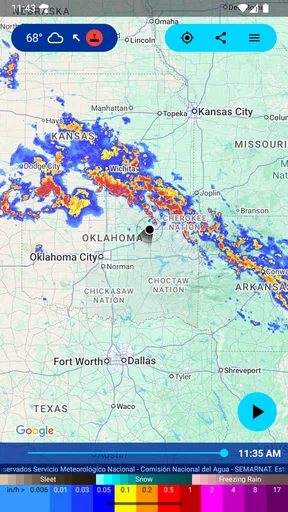
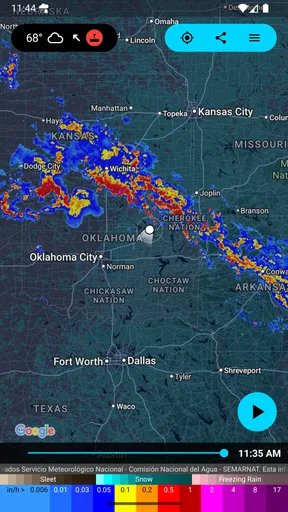
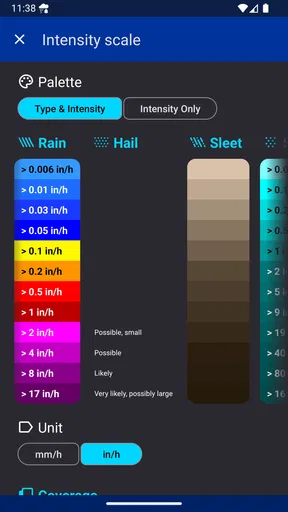
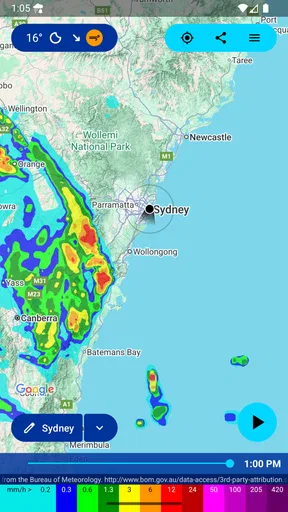
The interactive radar map is helpful when I want context rather than a yes-or-no notification. Watching precipitation move gives me a visual way to think about whether weather is heading toward my area or moving away. I would still treat that view as a guide, not a promise about the exact conditions on my street; local weather can change, and a map is most useful when I combine it with what I see outside.
For a realistic example, imagine I’m about to walk to a nearby appointment and the clouds are gathering. I can check the map before leaving, then use an alert as a reason to carry a jacket or wait briefly. If the trip is important, I would build in a practical backup rather than assume the warning will arrive at precisely the ideal moment. The value is having another useful signal before I commit to being outdoors.
Worth Reading Before You Choose

Baby Panda World Brings Quick Play to Modern Phones, but Its Game Library Feels Busy

ESPN’s Live Game View Makes Following Close Games Easier

QuizzLand Review: A Good Fit for Short Trivia Breaks, Not Every Player

Basketball Stars: Multiplayer Is Fast, but Can It Recover When Matches Go Wrong?

WEBTOON Turns Phone Updates Into a Better Reading Routine

Link to Windows Runs on Shared Habits, Not Social Feeds
Where it fits among weather apps
Many general weather apps put the day’s temperature, conditions, and forecast first. That broader view is valuable when I’m planning several hours ahead or comparing the weather in different places. Rain Alarm has a narrower purpose: it is centered on nearby rain and the timing of a possible interruption. I’d choose it for quick decisions about going outside, while keeping a conventional forecast app for the rest of my planning if I need one.
That focus is also a trade-off. A rain alert cannot answer every question a traveler or outdoor planner may have, and it should not be mistaken for a complete forecast. If I need to plan a weekend trip, judge heat, or compare conditions across a long route, a broader weather service is the more natural starting point. If the main question is whether rain may affect a near-term errand, the focused view can be easier to act on.
Who will get the most from it
I can see this being especially useful for people whose routines involve short trips and open-air plans: walkers, cyclists, parents taking children out, dog owners, and anyone who works outside. It can also help when plans are easy to shift, because a timely heads-up gives me room to delay, reroute, or take basic rain gear. If I rarely go outdoors or already check a detailed forecast before every trip, the extra alert layer may not change much for me.
There is a human handoff too: the app can notify me, but I still have to notice the alert and decide what to do. A notification that arrives while my phone is muted, out of reach, or being ignored cannot help with a decision I have already made. I’d treat alerts as a convenience, not as a guarantee that I’ll always be warned before rain reaches me.
What to expect from setup and everyday use
The adjustable detection range gives me a way to think about how much surrounding area matters to my plans. A smaller area makes sense when I only care about conditions close to home; a wider one may be more useful if I’m preparing to travel or want to watch weather approaching from farther away. I would avoid choosing a range simply because “more” sounds safer: a broad view can be harder to translate into a decision about one specific outing.
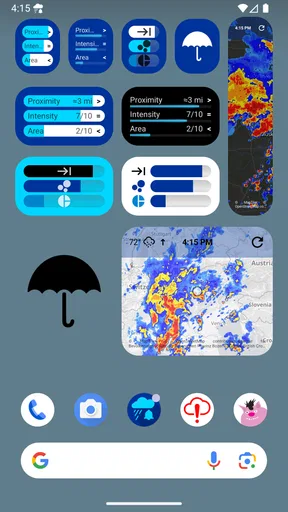
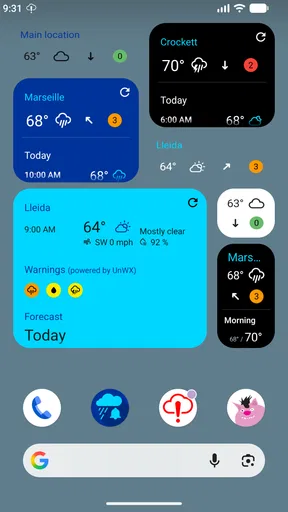
A home-screen widget can make a quick check easier by bringing weather information closer to the places I already look. I’d use that for glanceable awareness, then open the map when I need to understand movement or context. This two-step habit keeps the widget from becoming a substitute for checking the detail when a plan matters.
Rain Alarm is a free weather app from Michael Diener - Software, rated for Everyone. It has a 4.3 average from around 66,000 ratings and more than 10 million installs, which suggests it has found a substantial audience. In-app purchases range from $1.99 to $54.99 per item, so I’d check the purchase options shown in the app before deciding whether any extra is worthwhile. The core question for me is whether rain-focused alerts solve a recurring problem in my day.
One practical habit is to compare an alert with the sky and the map before changing an important plan. If the warning concerns a longer outing, I’d also check a general forecast for the rest of the trip. This is not extra work for its own sake; it is a way to use a focused rain tool without asking it to answer questions beyond its purpose.
Ever been caught in the rain without an umbrella, wishing you had a heads-up? Well, let me introduce you to Rain Alarm, an app that’s got you covered, literally! I’ve been using this nifty weather app for a while, and it’s become my go-to for staying dry and planning my outdoor activities. Let’s dive into what makes it tick.
What Is Rain Alarm All About?
So, what’s the deal with Rain Alarm? It’s a weather app with a twist. Instead of just giving you the usual forecast, it alerts you in real-time about impending rain in your area. This is a game-changer if you’re like me and love spontaneous outdoor adventures but hate getting drenched.
The app uses data from weather radars to provide accurate and timely alerts. Whether you’re planning a picnic or just a walk to the store, Rain Alarm ensures you’re informed before the skies open up.
Features That Stand Out
Let’s talk features because Rain Alarm packs quite the punch:
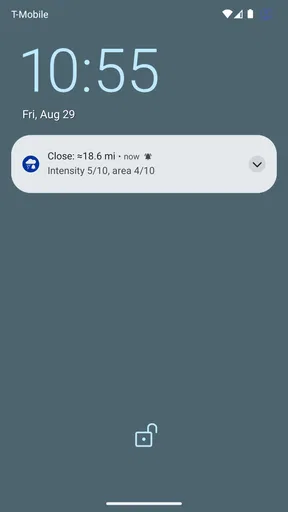
- Real-Time Alerts: Get notified as soon as rain is detected near you. No more surprises!
- Customizable Radius: You can set the detection range, which is super handy if you’re traveling or just want a broader scope.
- Interactive Map: View a live radar map showing precipitation movements. It’s like your personal weather station.
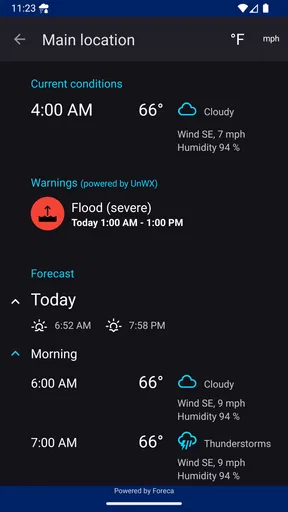
- Widget Support: Add a widget to your home screen for quick updates without opening the app.
How It Enhances Daily Life
Now, I know what you’re thinking: “How often do I really need rain alerts?” Trust me, once you start using this app, you’ll wonder how you managed without it. Imagine planning a day at the park, only to receive a timely alert that rain is just minutes away. It saves you from getting soaked and lets you adjust your plans with ease.
Plus, the interactive map feature is not just functional but also oddly satisfying. Watching the weather systems move across the map is like having your own personal weather channel.
User Experience
Let’s talk about how it feels to use Rain Alarm. First off, the interface is sleek and intuitive. Whether you’re a techie or not, you’ll find it easy to navigate. Setting up your alerts is straightforward, and customizing the radius is as simple as dragging a slider.
The app performs smoothly without any noticeable lag, which is crucial for real-time updates. Plus, the notifications are clear and actionable, giving you just the right amount of info without overwhelming you.
Final Thoughts
In a world where weather can be unpredictable, Rain Alarm is your trusty sidekick. It’s more than just an app; it’s a must-have tool for anyone who values their outdoor time. Whether you’re an adventurer or just someone who hates getting unexpectedly soaked, this app will quickly become indispensable.
So, if you’re tired of surprise showers ruining your plans, give Rain Alarm a download. It’s one of those apps that you’ll wonder how you ever lived without. Stay dry, my friends!
Pros
- Accurate real-time weather alerts.
- Customizable notification settings.
- User-friendly interface design.
- Low battery consumption.
- No ads in the paid version.
Cons
- Limited features in the free version.
- Occasional false rain alerts.
- Requires internet for updates.
- Limited to specific regions.
- No offline weather history.
FAQs for Rain Alarm
What features does Rain Alarm offer to help me avoid getting caught in the rain?
Rain Alarm provides real-time notifications and alerts based on your location, helping you stay informed about impending rain showers. The app uses reliable weather radar data to forecast rain events, ensuring you receive timely warnings. Additionally, it offers customizable settings for alert sounds and vibration patterns, allowing you to tailor notifications to your preferences.
How accurate is Rain Alarm in predicting rain and storms?
Rain Alarm uses high-quality weather radar data to provide accurate predictions of rain and storms. The app continuously updates its forecasts to ensure you receive the most current information. While no weather app can guarantee 100% accuracy, Rain Alarm's use of real-time data and alerts makes it a reliable tool for anticipating rain events.
Is Rain Alarm compatible with both Android and iOS devices?
Yes, Rain Alarm is available for both Android and iOS platforms. Users can download the app from the Google Play Store for Android devices or the Apple App Store for iOS devices. The app is optimized to run smoothly on various devices, ensuring a seamless experience regardless of your operating system.
Does Rain Alarm consume a lot of battery and data?
Rain Alarm is designed to be efficient in its use of battery and data. While it runs in the background to provide real-time alerts, it minimizes energy consumption by optimizing its processes. Data usage is kept low by only downloading necessary weather radar information, making it a battery-friendly and data-efficient tool.
Can I customize the notifications I receive from Rain Alarm?
Yes, Rain Alarm offers extensive customization options for notifications. Users can choose specific alert sounds, vibration patterns, and even set quiet hours to avoid disturbances. The app allows you to adjust sensitivity settings, ensuring you only receive alerts for rain events that are relevant to your needs, enhancing personal convenience.


